



CleoPic AI logoCleoPic AI

AI Style Transfer

AI style transfer redraws your photo in the look of another picture: it keeps the people, layout and shapes of your image and borrows the colors, brushwork and texture of a style reference or a style you describe. Add your photo and a style image, say what to keep, and this AI image style transfer paints a new version you can download.

Model
References (optional)
References (optional)0/16

Up to 16 reference images · JPEG, PNG or WebP. Larger images are resized to fit.

284 / 20,000

Number of Images
Paid Feature
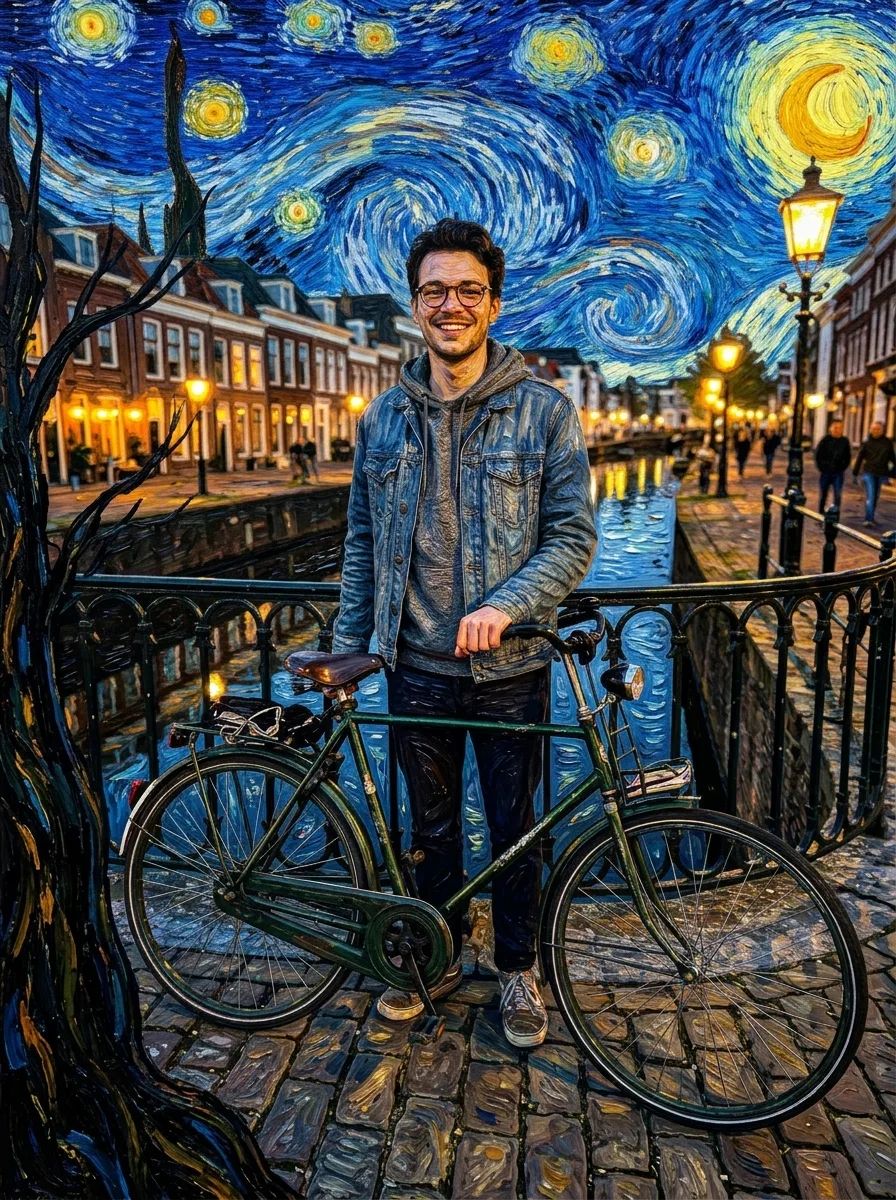
  • The canal bridge photo repainted in the style of The Starry Night: the young man and his green bicycle under a swirling blue sky of glowing stars, in thick oil brushstrokesPhoto of a young man in round glasses and a denim jacket standing with a green bicycle on a canal bridge at dusk, with lit street lamps and brick houses behind him
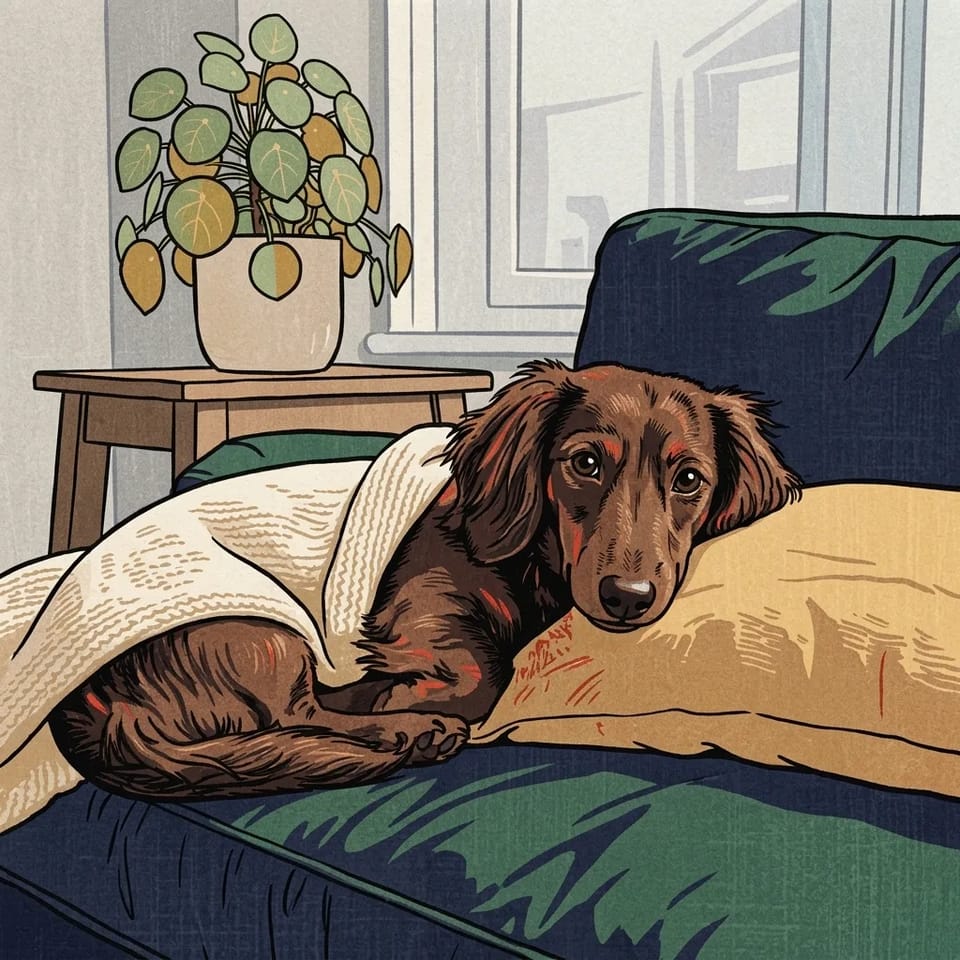
  • The dachshund photo redrawn as a ukiyo-e woodblock print, with bold outlines and flat indigo, green and ochre on textured paperPhoto of a long-haired brown dachshund curled on a green velvet sofa under a cream knitted blanket, its chin on a mustard cushion
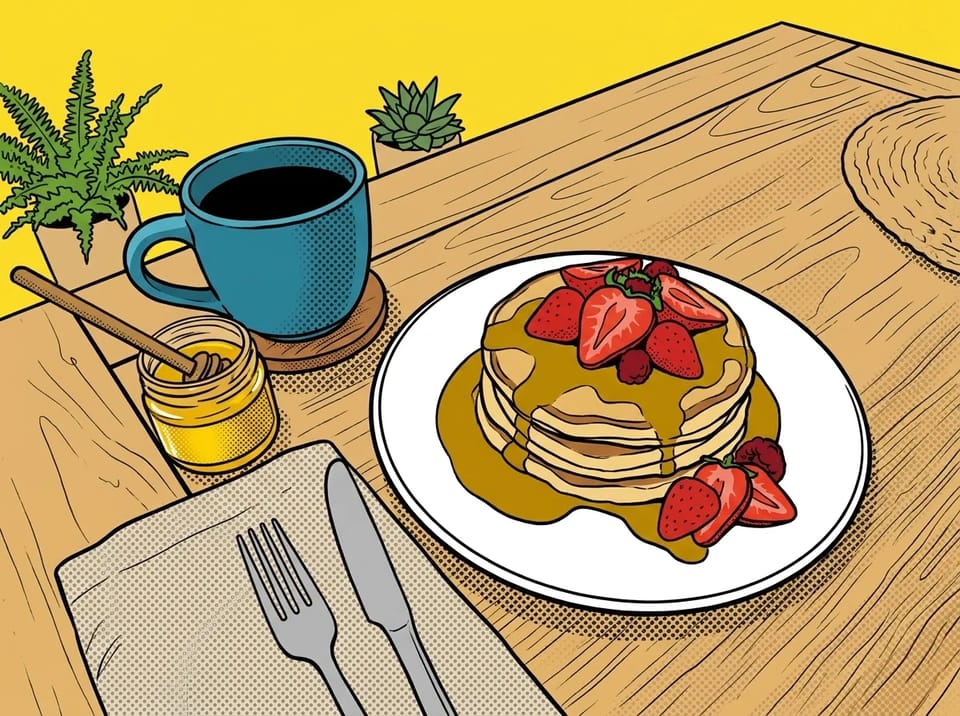
  • The breakfast photo turned into 1960s pop art, with thick black outlines, halftone dots and a bright yellow background behind the pancakes and coffee mugPhoto of a breakfast table with a stack of pancakes topped with strawberries and syrup, a turquoise coffee mug and a small jar of honey

More Tools

How to Use AI Style Transfer in 4 Steps

Add the photo you want to change under References first, so it shows as @img1. AI style transfer keeps what is in this picture, so choose one with a clear subject and good light; the AI image style changer accepts JPEG, PNG and WebP files.

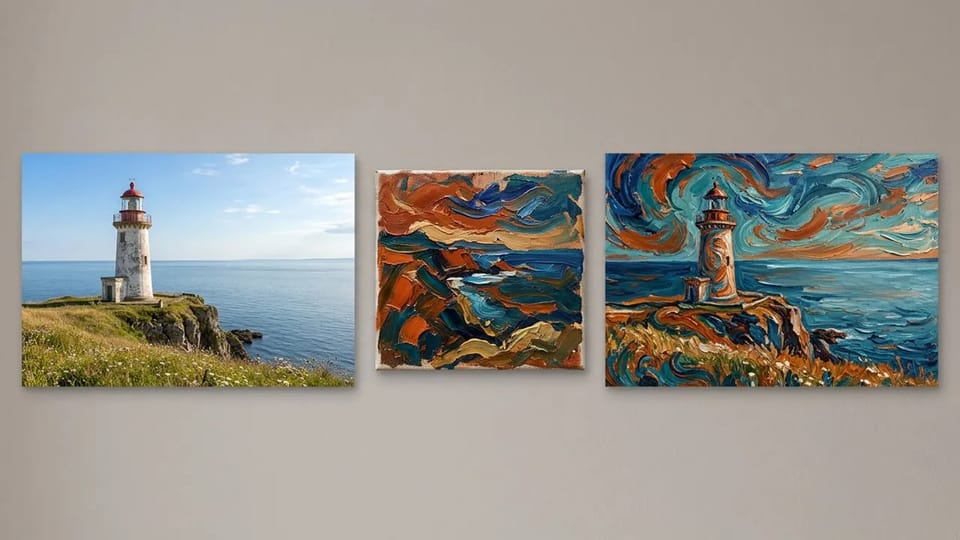
Three pictures side by side: a photo of a white lighthouse on a cliff, a small painting with swirling orange and teal strokes, and the lighthouse repainted in that swirling style

AI Style Transfer From Your Own Style Reference Image

AI style transfer works best with two pictures: your photo first, then the style image whose look you want. Add both under References, photo first, and write a line such as redraw the first image in the style of the second. The AI image style transfer keeps the subject, pose and layout of your photo and takes the palette, brushwork and texture from the reference.

The style reference can be a painting you love, a poster, a page of your own sketchbook or another AI image. A reference with one clear style gives a cleaner AI style transfer than a busy collage, and a short note on what to keep, such as faces or the skyline, steers the AI art style transfer toward the result you want.

Start My AI Style Transfer
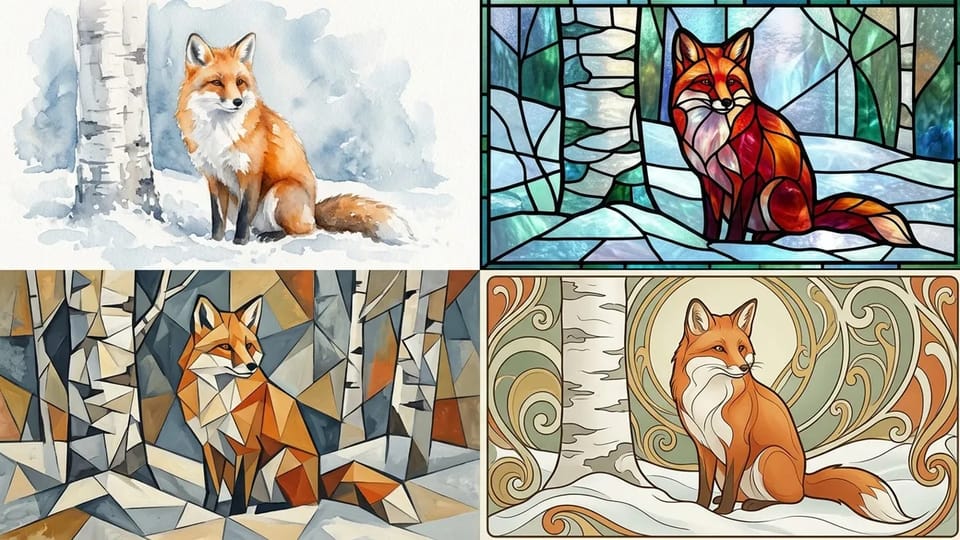
The same red fox sitting in snow shown four times in a grid: as a watercolor, as stained glass, as a cubist painting and as an Art Nouveau poster

Styles You Can Apply With AI Style Transfer

AI style transfer is not limited to a preset list. Use the AI art style changer to restyle a photo as watercolor, stained glass, cubism, Art Nouveau, ukiyo-e, pop art or pencil sketch, or borrow a mood such as golden-hour light or a faded film palette. As an AI image style changer, it can take a style from any picture you can upload.

When you already know the one look you want, a dedicated page sets it up for you: photo to anime, the Ghibli AI generator, photo to cartoon, or convert a photo to an oil painting. Turning a photo into a painting of any kind is a related task with its own tool. AI style transfer is the open option for every other style, and the AI photo style transfer works the same way for each one.

Try AI Style Transfer
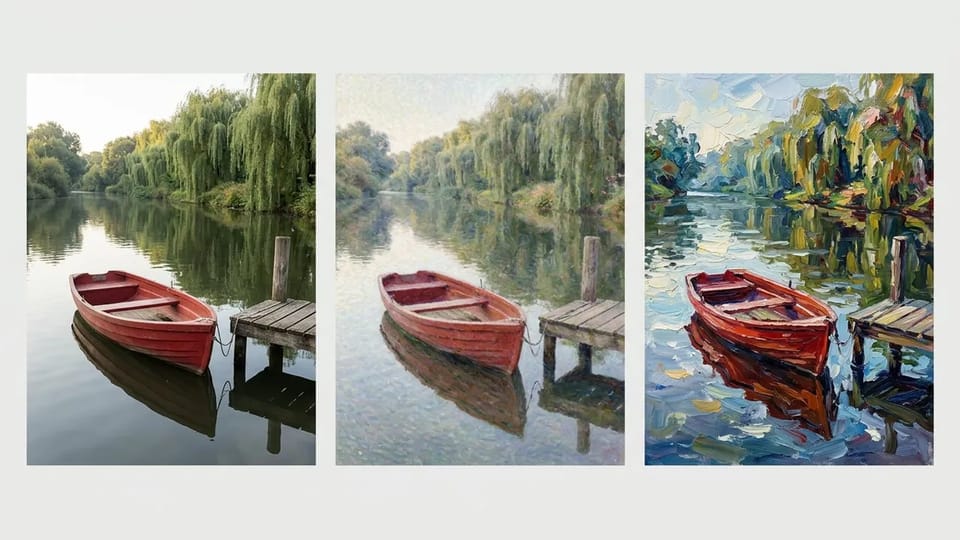
Three versions of a red rowing boat by a wooden jetty on a river: a photo, a light impressionist version and a fully repainted impressionist oil painting

Control How Strong the AI Style Transfer Is

You decide how far the AI style transfer goes by what you write. For a light touch, ask the AI image style changer to keep the details and change only the colors and texture; the image stays close to your photo, which suits faces and pets. For a full repaint, ask for bold brushstrokes everywhere and let the reference style take over.

If the AI image style transfer drifts from your photo, name what must stay the same, such as the face, the pose or the outline of the scene, and run the AI style transfer again. To push it further, describe the brushwork in more detail or add a second example of the same style to the AI art style changer.

Set My Style Strength

What People Use AI Style Transfer For

People use AI style transfer to see a photo in the style of an artwork they love, to remake an old drawing with an AI art style changer and to give a whole set of photos one shared look with AI image style transfer.

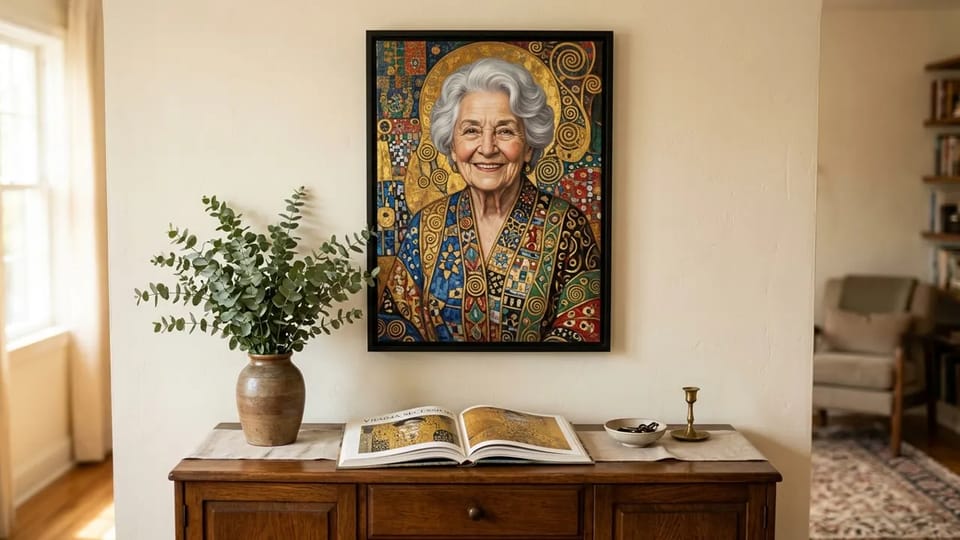
Framed portrait of a smiling silver-haired woman painted with gold leaf patterns and spirals, hanging above a sideboard with eucalyptus and an open art book

AI Style Transfer From a Favorite Painting

Pick a painting you love, such as a gold-patterned Vienna portrait or a swirling night sky, and use AI style transfer to see your own photo in that style. Public-domain artworks make the easiest style references for an AI image style transfer, and a family portrait restyled this way makes a personal gift or print.

Restyle My Photo

More AI Image Style Transfer Options

Describe a style for AI style transfer

No style image? Name the style in the prompt, such as 1960s pop art or Japanese woodblock print, and AI style transfer applies it to your photo. A one-tap AI filter applies one fixed look; the AI art style changer here takes any style you write.

Write a style prompt from a picture

The photo button beside the prompt box writes a prompt that recreates any picture you upload. Use it to turn a style you like into words, then edit the words for your AI image style transfer.

Turn an idea into three prompts

The wand beside the prompt box rewrites a rough idea into three different prompts. Pick one and run it as your AI style transfer, or mix lines from two in the AI image style changer.

Choose a style transfer AI tool model

Pick from Nano Banana, GPT Image, Seedream and Grok Imagine models. AI style transfer with a photo plus a style image needs a model that takes two or more references; Grok Imagine takes one, so use it when you describe the style in words.

Set the ratio and resolution

Keep the shape of your photo or pick a square, portrait or wide frame, and choose 1K, 2K or 4K where the model offers it. The AI image style changer shows the Credit cost of each choice before you generate the AI style transfer.

AI Style Transfer, Image to Image AI and AI Filters Compared

Three tools change how a picture looks, and they keep different things. AI style transfer keeps your photo and changes its style; image to image AI uses a reference to make a new picture; a one-tap AI filter applies one fixed look.

What each tool keeps and what it changes

A comparison of AI style transfer, image to image AI and one-tap AI filters by input, what changes, what stays and best use
QuestionAI style transferImage to image AIOne-tap AI filter
What you give itYour photo plus a style image, or a style written in wordsA reference image and a prompt for the new pictureA photo and one preset picked from a list
What changesColors, brushwork, texture and lightingSubject, scene and style can all changeThe colors and texture of that one preset
What staysThe people, pose, layout and main shapes of your photoOnly what the prompt asks to keep from the referenceMost of the photo, in one fixed treatment
Where the style comes fromAny picture you upload, or any style you can describeThe prompt, guided by the referenceThe preset library of the app
Best forA specific look on your own photo, drawing or photo seriesNew pictures based on an idea or a mood boardA quick, familiar effect with no writing

This page does AI style transfer: add your photo and a style image to try it.

AI Style Transfer FAQ

Answers about style references, results, Credits and rights for AI style transfer and AI image style transfer on CleoPic AI.

Restyle Your Photo With AI Style Transfer

Add your photo and a style image, say what to keep, and the AI image style transfer returns a new version in the look you chose.