
How to Write AI Image Prompts, Step by Step
Learn how to write AI image prompts in ten steps, tested on one mug with three pictures shown. Build your own prompt from five parts.
Table of contents
To write an AI image prompt, describe five things in plain words: the subject, the setting, the light, the framing and the style. This guide shows how to write AI image prompts in ten steps, with one worked test: a three-word prompt, a five-part prompt and a one-phrase change for the same coffee mug, run on Nano Banana 2 with all three outputs shown. You finish with one tested prompt to adapt for your own picture and a rule for what to change when a result misses.
What does an AI image prompt need?
An AI image prompt works well when it covers five parts: a subject, a setting, a light source, a framing and a style with a palette. Each part replaces a decision the image generator would otherwise make for you. This is the prompt used in the test at the end of this guide:
A matte sage-green ceramic mug with a thick rounded handle, filled with steaming black coffee, on a light oak table beside a window. Soft morning light from the left. Close-up from a slightly low angle with a shallow depth of field. Clean product photo in warm cream and oak tones, plain uncluttered background.
The table splits it into the five parts.
| Part | The question it answers | Words in the tested prompt |
|---|---|---|
| Subject | What is the picture of? | A matte sage-green ceramic mug with a thick rounded handle, filled with steaming black coffee |
| Setting | Where is it, and what is behind it? | on a light oak table beside a window; plain uncluttered background |
| Light | Where does the light come from? | Soft morning light from the left |
| Framing | How close is the camera, and from where? | Close-up from a slightly low angle with a shallow depth of field |
| Style and palette | What kind of picture is it? | Clean product photo in warm cream and oak tones |
Five parts is a working checklist, not a standard. Leave a part out when you do not care about the answer, and the generator will choose for you.
How to write an AI image prompt
Write the parts in this order: subject, setting, light, framing, style. Check each one against the line that ends its step.
Step 1: Name the subject in specific words
Name the subject with its material, its color and one distinctive detail, because the subject is the first thing a viewer looks at. "A coffee mug" leaves the glaze, the shape and the contents to the generator; in Run A below, that produced a speckled cream mug with latte art. "A matte sage-green ceramic mug with a thick rounded handle, filled with steaming black coffee" fixes all three.
Check: a person who reads only the subject phrase could sketch your picture.
Step 2: Describe the setting
Say where the subject sits and what is behind it, in short phrases that agree with each other. Naming a place puts it in the frame. In Run B below, "beside a window" produced a window, while the same prompt also asked for a plain, uncluttered background, so the two phrases pulled in different directions.
Check: every place and object in the setting phrases is something you want to see, and no two phrases contradict each other.
Step 3: Say where the light comes from
Name the light source and its direction in everyday words, such as "soft morning light from the left" or "warm lamplight from the right", because light sets the mood and the shadows. Run A left the light to the model and got warm cafe light; Run B named a window on the left and got one. Skip lighting jargon unless you already know what it does.
Check: you can say which side of the subject should be brighter.
Step 4: Choose the framing
Say how close the camera is and from which angle, with plain words such as "close-up", "wide shot", "from a slightly low angle" or "shallow depth of field" for a blurred background. In Run B, "close-up" and "shallow depth of field" were followed, but the camera sat slightly above the rim of the mug, not at the low angle the prompt asked for, and Run C did the same. When a plain word does not give the result, say it more directly first, for example by stating the camera height relative to the subject, and add lens details only after that. Lens numbers and camera models are optional extras.
Check: you know what is cropped out of the picture.
Step 5: Set the style and palette
End with the kind of picture and the colors that lead, for example "clean product photo in warm cream and oak tones". Run A named no style and came out as a cafe-style photo with people in the background. Start with one style, because it is easier to judge a result when you change one thing later. For photo-like pictures, see the realistic AI image generator page.
Check: the phrase says whether the result is a photo, an illustration or a 3D render, and which colors lead.
Step 6: Read it back as plain sentences
Put the parts together in the order subject, setting, light, framing, style: from what the picture shows to how it looks. Then read the result aloud. If two people would picture different images, a part is still vague. The Run B prompt is 53 words long, which covered five parts; length is not the goal, clarity is.
Check: each part answers one question from the table, and nothing is said twice.
Step 7: Choose the aspect ratio
Choose the aspect ratio before you run the prompt, because it decides how much room the framing has. Square is a common choice for a feed post or a product listing, a wide ratio (16 by 9) for a blog header, and a tall ratio (9 by 16) for a story.
Check: the ratio matches the place the picture will be used.
Step 8: Add a reference image only when you need one
Add a reference image when the picture must keep a real object, face or layout. Then write what stays and what changes, in a short pattern such as "keep the mug exactly as it is; change the table to white marble". That pattern is a suggestion and was not run in this guide.
Check: the prompt names the one thing that stays the same and the one thing that changes.
Step 9: Run it in CleoPic AI
In CleoPic AI, the steps are:
- Open the AI picture generator. It starts with a sample prompt and a sample reference image, so replace the text and remove the thumbnail if you want to start from words alone.
- Open Model and choose Nano Banana 2.1 under Google. The test below ran on Nano Banana 2, the model Nano Banana 2.1 replaced.
- Paste the prompt, then set Aspect ratio and Resolution (1K, 2K or 4K; 1K is the default).
- Optional: add reference images under References, up to 10 images of 30 MB each on Nano Banana 2.1, in JPEG, PNG or WebP format.
- Press Generate. If you are not signed in, you sign in with Google at this point. The cost in Credits shows on the button before you press it.
Check: the image you get matches the ratio you picked, and you saw the cost before you committed.
Step 10: Change one thing per round
After the first result, change one part of the prompt and run it again, so you know which words caused the difference. A new run is a new image, so other details can shift as well; judge the part you changed. The table is a rule of thumb for choosing the part, not a tested result.
| If the picture shows | Change this part |
|---|---|
| The wrong object, color or material | Subject |
| Unwanted objects, people or a busy background | Setting |
| The wrong mood, or hard or flat shadows | Light |
| The wrong distance, angle or amount of blur | Framing |
| The wrong kind of picture, or the wrong colors | Style and palette |
In Run B below, the background (setting) and the camera angle (framing) missed, so those were the two parts to try first; Run C changes the setting phrase only. Stop when the image does what the picture is for, not when it is perfect.
Check: you can name the one phrase you changed between two runs.
One mug, three prompts: what each one produced
A three-word prompt left every decision to the model, the five-part prompt fixed most of the decisions it named and missed the plain background and the low angle, and changing one phrase fixed the background but not the angle. The three runs use one subject and one model, Nano Banana 2; Runs A and B were made on October 9, 2026 and Run C on October 10, 2026. Each prompt produced one picture, each picture is 1,024 by 1,024 pixels, and all three are shown. They show what each level of detail decided, not which prompt is best for every picture; another run of the same prompt, or another model, gives a different picture.
Run A: three words
Prompt: a coffee mug
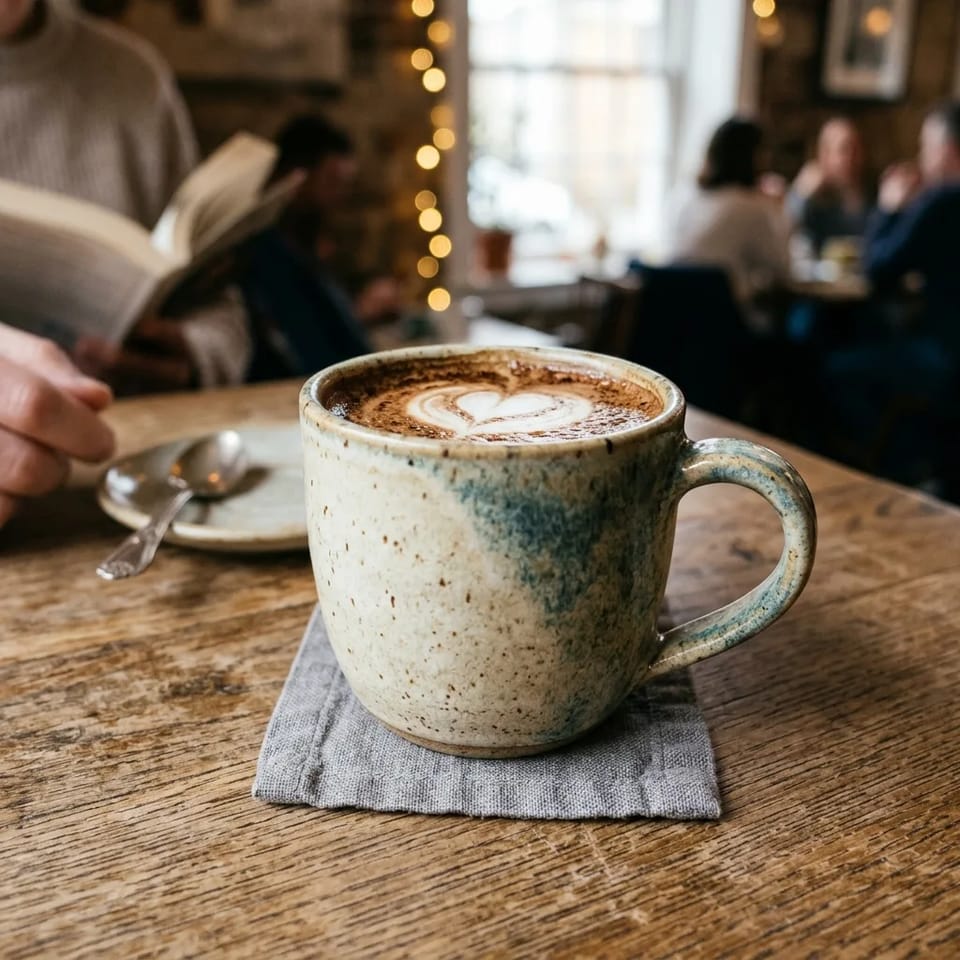
The picture is attractive, and almost every decision in it was the generator's own: the glaze, the latte, the napkin, the spoon, the people and the string lights are all details the prompt never mentioned. It would suit a cafe post, but it would not suit a clean shop listing. A short prompt is not wrong; it hands every unstated choice to the model.
Run B: the five-part prompt
Prompt:
A matte sage-green ceramic mug with a thick rounded handle, filled with steaming black coffee, on a light oak table beside a window. Soft morning light from the left. Close-up from a slightly low angle with a shallow depth of field. Clean product photo in warm cream and oak tones, plain uncluttered background.
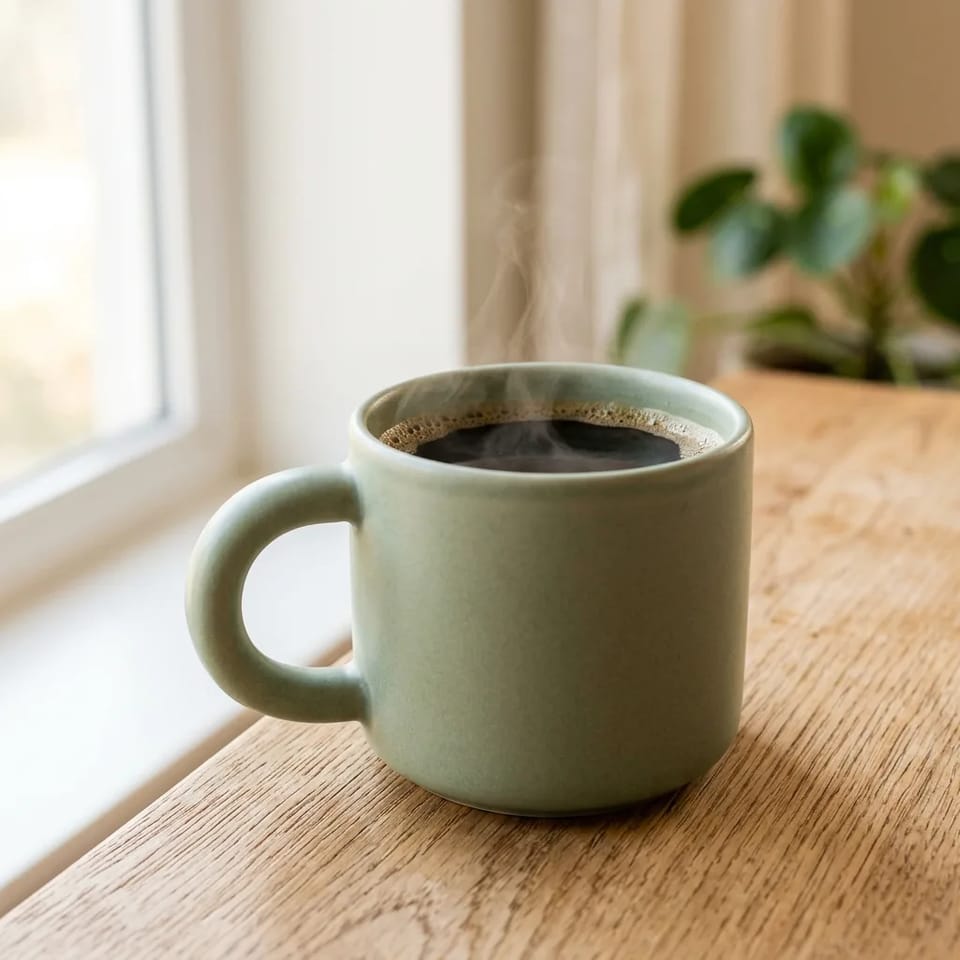
Run B follows most of the prompt: a matte sage-green mug with a thick rounded handle, black coffee with a thin curl of steam, light oak grain, a bright window on the left and a blurred background. It misses two things. The window was requested, but the potted plant behind the mug was not, so the background is not plain. The camera also sits slightly above the rim of the mug rather than at a low angle. The prompt asks for a window and a plain background in the same breath, which may explain part of the first miss.
Run C: one phrase changed
Prompt: Run B with only the setting phrase changed, "beside a window" became "in front of a plain cream wall".
A matte sage-green ceramic mug with a thick rounded handle, filled with steaming black coffee, on a light oak table in front of a plain cream wall. Soft morning light from the left. Close-up from a slightly low angle with a shallow depth of field. Clean product photo in warm cream and oak tones, plain uncluttered background.
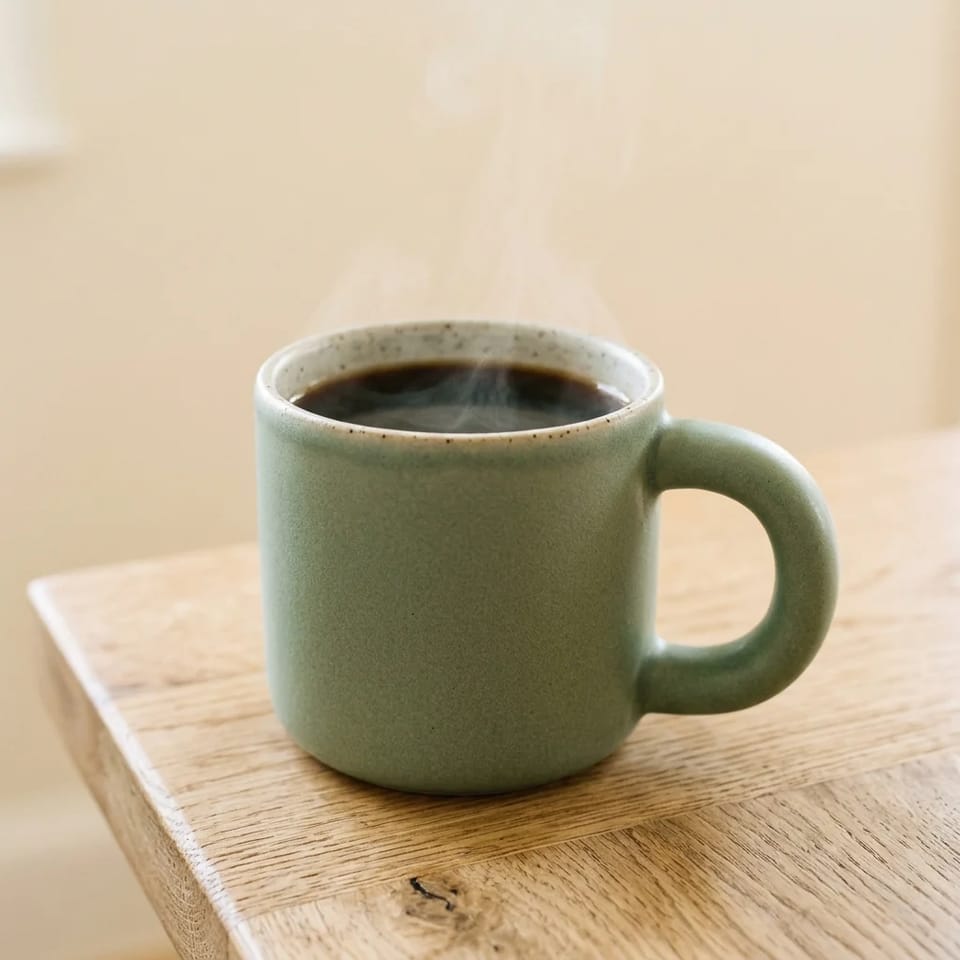
Run C fixed the background: there is no window and no potted plant, only a plain cream wall with a faint glow at the far left edge. The camera angle did not change. It still sits slightly above the rim, so "from a slightly low angle" was not followed in either run. A new run is a new image, so other details moved as well: this mug has a speckled rim and its handle is on the right, where Run B's was on the left.
What the three runs show
The table lists who decided what in each run.
| Decision | Run A: a coffee mug |
Run B: the five-part prompt | Run C: one phrase changed |
|---|---|---|---|
| Subject | Model: speckled cream mug, latte with heart-shaped foam | Prompt: followed, with thin steam | Prompt: followed, with thin steam; the speckled rim was the model's |
| Light | Model: warm cafe light | Prompt: bright window on the left, soft light | Prompt: soft light, no window |
| Framing | Model: close view from slightly above the rim | Prompt: close-up and shallow depth of field followed; angle slightly above the rim, not low | Same as Run B: angle again slightly above the rim |
| Background | Model: busy cafe with people and string lights | Prompt: window as requested; an unrequested potted plant | Prompt: plain cream wall as requested |
| Fit for a clean shop listing | No: people and props fill the frame | Close: the background and the angle need another round | Closer: the background is plain; the angle is still above the rim |
In these runs, naming the parts returned most of what the prompt asked for, and changing one phrase fixed one miss: the background. The angle did not respond to the plain wording in two runs, so it is the next sentence to change. Stating the camera height directly, as step 4 suggests, is the thing to try next; it was not run here.
To make the prompt yours, replace the first sentence with your own subject and place, then change the color words and the background phrase in the last sentence to match. Decide between "beside a window" and "plain uncluttered background" before you reuse it, because the two pulled against each other in Run B; Run C shows the plain-wall version. Keep the light and framing sentences as a starting point, and change them one at a time. The table suggests where to start for three common uses; it is advice, not a tested result.
| Use | Change first | Aspect ratio to try |
|---|---|---|
| Product listing | Subject (your product) and setting (a plain surface) | Square |
| Blog header | Setting (the scene your article needs) | Wide, 16 by 9 |
| Social post | Subject and style (the mood you want) | Square or tall |
FAQ
How long should an AI image prompt be?
Long enough to answer the five parts, and no longer. The Run B prompt has 53 words. Add words only when each one adds a decision; repeating adjectives such as "beautiful" or "stunning" does not add one. If a result drifts, shorten the prompt to the parts that matter and rebuild it one part at a time.
Should I write sentences or keywords?
Start with plain sentences or short phrases that a person could read aloud. Some tools, especially older ones, expect comma-separated tags instead, and the guide for the tool you use will say so. The three runs in this guide used plain sentences only and did not test keyword lists.
Should I use negative prompts?
A negative prompt is a separate field that lists what should not appear, and the generator in CleoPic AI has a single prompt box instead. Describe what you want in place of what you want to avoid, such as an empty table by a plain wall. A thing you name can end up in the picture, as the window did in Run B, so a list of things to avoid may bring them in; this guide did not test that.
Will the same prompt work in every AI image generator?
The five-part method carries over, but the results and some syntax do not. Plain sentences are a safe starting point. Some tools add their own options, such as weights, flags or tag lists, and each tool's own guide explains them. The test in this guide used one model, so its pictures show what that model did with these prompts, not what another model would do.
Can AI write my image prompt for me?
Yes, a chat assistant can draft a prompt for you, and the draft is worth checking against the five parts before you run it, because a draft that skips the light or the framing leaves those choices to the image generator.
Where can I find AI image prompt examples to copy?
Start with the five-part prompt in this guide: it was run, and its output is shown above. Copy the structure, then replace the subject and the setting with your own. A copied prompt that keeps its subject gives you that subject again, so the replacement is the part that makes it yours.
How many Credits does it take to try a prompt in CleoPic AI?
As of October 21, 2026, one Nano Banana 2.1 image costs 4 Credits at 1K, 6 at 2K and 9 at 4K, and the cost shows on the Generate button before you press it. Generating needs a Google sign-in. The terms and the pricing page cover Credits and plans.